mySQL
 SQL stands for Structured Query Language. SQL is a international standard in querying and retrieving information from databases.
mySQL is essentially an SQL server - it responds to requests for information that are written in SQL. You can communicate
with mySQL using a wide variety of programming languages (PHP being one of the most common). mySQL is Open Source software
and generally free for use.
SQL stands for Structured Query Language. SQL is a international standard in querying and retrieving information from databases.
mySQL is essentially an SQL server - it responds to requests for information that are written in SQL. You can communicate
with mySQL using a wide variety of programming languages (PHP being one of the most common). mySQL is Open Source software
and generally free for use.
Refer to the following links for more information about mySQL :
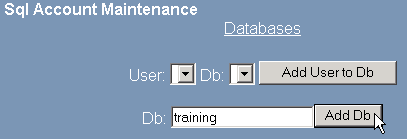
To create a mySQL database:
-
Click on the SQL Database link in the Advanced Menu area.
-
Enter the name of the database in the Db field.
-
Click on the  button. The database will be added to the /var/lib/mysql folder.
You need to create at least one database user and grant that user permission to use the new database. Refer to Creating a mySQL user and Grant a user's permissions to a mySQL database for more information.
Topics:
Removing a database
Creating a mySQL user
Grant a user's permissions to a mySQL database
Managing mySQL databases
Adding host access